

Best receipt scanner app for itemizing receipts (2026)
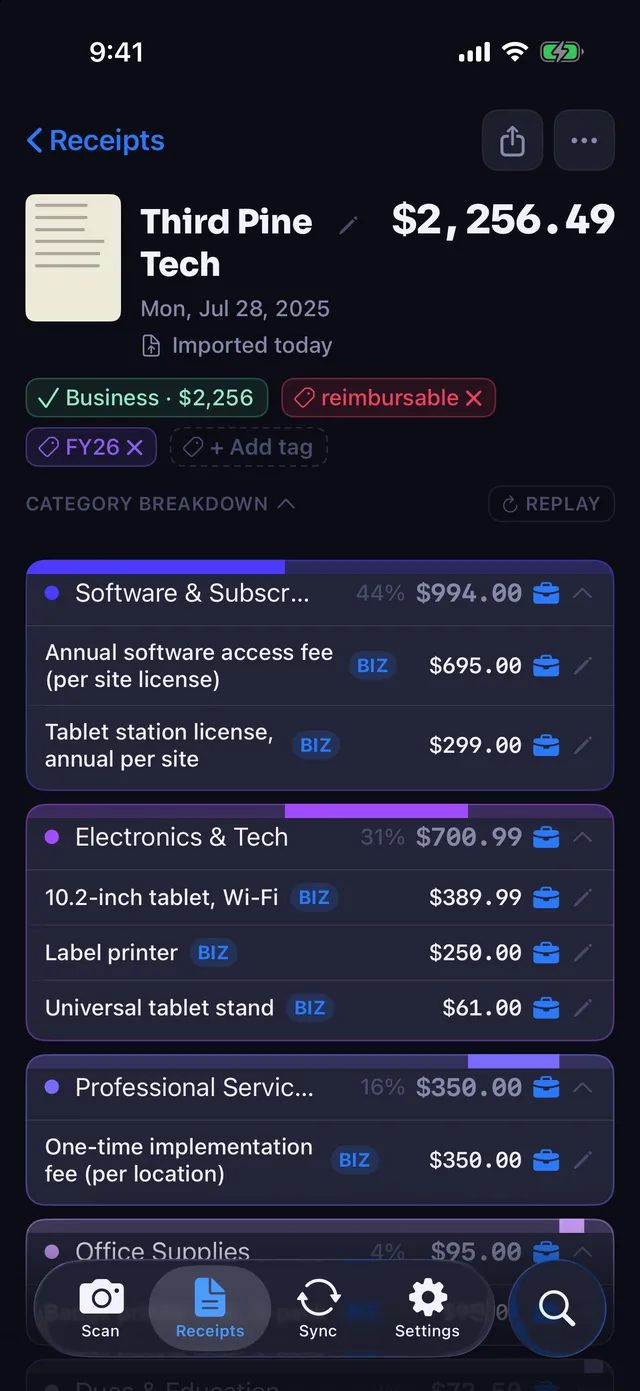
Itemizing means giving every line on a receipt its own category, so one Costco trip can include items in several different categories, like groceries, office supplies and household goods. Six of the seven apps compared here read line items. Pick Receipt Rabbit for iPhone, Dext for bookkeeping firms, or SparkReceipt for Android.

Comparison table
Tinted cells compare with Receipt Rabbit: a check on green matches it, an x on red falls short. Untinted cells are not stated or are plain facts.
| App | Reads line items | Per-line category or tag | Accounting sync | Platforms | Free tier | Paid tier | Compared to Receipt Rabbit |
|---|---|---|---|---|---|---|---|
| Receipt Rabbit | Yes | Yes, one of 42 categories per line, plus business or personal per line | QuickBooks Online (one Expense per receipt, split across your QuickBooks categories), Xero (one spend money transaction per receipt, split across your expense accounts), and Lunch Money (split by category) | iPhone only (iOS 18 or later) | 30 receipts a month, no account needed | Pro: 300 receipts a month, $7.99 a month or $59.99 a year (annual starts with a 7-day free trial) | (this app) |
| SparkReceipt | Does not match Receipt Rabbit: Yes, Elite plan only | Not stated per line (sorts into tax categories) | Matches Receipt Rabbit: QuickBooks Online, Xero | iPhone, Android, web | Does not match Receipt Rabbit: None; 7-day trial | Pro $69 a year, 50 documents a month, no line items. Elite $129 a year, unlimited (fair use), line items included. Extra users $1 a month | Line items cost $129 a year; Receipt Rabbit includes them on every plan, free tier too |
| Dext | Does not match Receipt Rabbit: Yes, as a paid add-on | Categories suggested automatically | Matches Receipt Rabbit: 36+ platforms, including QuickBooks Online, Xero, Sage, FreeAgent | iOS, Android, desktop | Does not match Receipt Rabbit: None; 14-day trial | Business plan $25.21 a month billed annually, 250 documents; line-item add-on from $20.50 a month or $0.50 per document | Line items add at least $20.50 a month on top of the plan |
| TaxLens | Matches Receipt Rabbit: Yes | Matches Receipt Rabbit: Yes, an IRS tax category per line, swipe to mark personal items | Does not match Receipt Rabbit: CSV export; no direct sync stated | iPhone, iPad, Mac, Apple Vision | Yes; scan limit not stated (unlimited exports need Pro) | Pro $4.99 a week, $9.99 a month or $49.99 a year | No QuickBooks Online or Lunch Money sync; you import a CSV yourself |
| Itemize AI | Matches Receipt Rabbit: Yes | Auto-assigned categories and per-item tags; business or personal not mentioned | Does not match Receipt Rabbit: None; CSV export | iPhone, iPad, Mac, Apple Vision | Does not match Receipt Rabbit: None; a subscription is required to use features | $4.99 a week or $39.99 a year | No free tier and no accounting sync |
| Receipt AI | Matches Receipt Rabbit: Yes | Matches Receipt Rabbit: Applies your own categories and tax codes | QuickBooks Online, Xero (Business plans only) | SMS, email, WhatsApp, web upload; no native app mentioned | First 10 receipts free | Pro from $29 a month, 100 pages, no accounting sync; Business plans add QuickBooks Online and Xero sync (price not stated) | QuickBooks Online sync starts above $29 a month; Receipt Rabbit includes it in Pro at $7.99 |
| Expensify | Not stated for SmartScan; manual split into separate expenses | Does not match Receipt Rabbit: Categories on each split piece, entered by hand | Matches Receipt Rabbit: QuickBooks Online, Xero on Collect | Not stated on the pages checked | Free plan; scan limit not stated on the pages checked | Collect $5 per member a month, unlimited SmartScans | Lines are split by hand, not read and categorized automatically |
How to choose
Choose Receipt Rabbit if you are a solo freelancer or a business under ten people on an iPhone, you want one receipt posted to QuickBooks Online as a single Expense split across several categories, you use Lunch Money, or you do not want an account.
Choose SparkReceipt if you need Android or a web upload, or want email-inbox and bank-feed intake. Line-item extraction is on its Elite plan.
Choose Dext if you run an accounting or bookkeeping firm processing documents for many client businesses, or your books are in Sage or FreeAgent.
Choose TaxLens if you travel and need receipts in 30+ currencies converted to your home currency at historical exchange rates.
Choose Itemize AI if you want to scan and review receipts on a Mac, iPad or Apple Vision Pro as well as an iPhone.
Choose Receipt AI if you want to text receipts by SMS or WhatsApp instead of installing an app, or five or more people need to submit to one account.
Choose Expensify if you need team approvals, mileage or card matching rather than line-level categories.
What Receipt Rabbit doesn't do
- iPhone only. No Android, no Mac, no iPad version, no web app.
- QuickBooks Online, Xero, and Lunch Money only. No FreshBooks, Wave, or YNAB sync.
- No team features: no approvals, no multiple users, no shared account.
- No mileage tracking.
- The free plan covers 30 receipts a month; QuickBooks Online, Xero, Lunch Money and the tax-year export need Pro. Email forwarding is included in Free.
FAQ
What does "itemized" mean in a receipt app?
The app reads every line (item name and price) along with the merchant, date and total, and gives each line its own category. One grocery run can then land in Groceries, Pharmacy and Household at once. An app that reads the lines but files the whole receipt under one category has not itemized it.
Which receipt apps categorize each line separately?
Of the apps checked, Receipt Rabbit, TaxLens, Itemize AI and Receipt AI state per-line categories or tags. Dext suggests categories and extracts line items as a paid add-on (from $20.50 a month, or $0.50 per document). SparkReceipt lists line-item extraction on Elite but does not state per-line categories.
Which apps can send split expenses to QuickBooks Online?
Receipt Rabbit posts one Expense per receipt, split into a separate line for each QuickBooks category on it. Receipt AI states it syncs line items to QuickBooks Online on its Business plans. Dext and SparkReceipt connect to QuickBooks Online; their pages checked do not state a line-level split.
Is there a free receipt app that itemizes and splits receipts by category?
Receipt Rabbit's free plan covers 30 receipts a month with each line categorized; QuickBooks Online, Xero, Lunch Money and the tax-year export need Pro. Email forwarding is included in Free. TaxLens has a free plan but does not state its scan limit, and unlimited exports need Pro ($9.99 a month). Receipt AI gives the first 10 receipts free, then starts at $29 a month. SparkReceipt (7 days) and Dext (14 days) offer trials only, and Itemize AI requires a subscription to use any feature.
Does Receipt Rabbit work on Android?
No. It is iPhone only.
Receipt Rabbit is on the App Store.
Sources, checked 2026-10-01
Receipt Rabbit's makers wrote this page. Competitor facts come from each vendor's own pages; "not stated" means the page did not say. Spot an error about your product? Email [email protected] with a link to your current page and we will correct it.
- SparkReceipt pricing: sparkreceipt.com/pricing
- SparkReceipt features: sparkreceipt.com/features/receipt-scanner
- SparkReceipt QuickBooks Online: sparkreceipt.com/integrations/quickbooks-online
- Dext pricing, 14-day trial and line-item add-on: dext.com/us/business/pricing
- Dext receipts scanner: dext.com/us/business/product/receipts-scanner...
- TaxLens itemized scanner: taxlensapp.com/features/itemized-receipt-scanner
- TaxLens home: taxlensapp.com
- TaxLens App Store listing (prices, devices): apps.apple.com/us/app/taxlens-receipt-scanner...
- TaxLens free plan wording: taxlensapp.com/receipt-management-app
- Itemize AI App Store listing: apps.apple.com/us/app/itemize-ai-receipt-scan...
- Receipt AI QuickBooks: receipt-ai.com/quickbooks
- Receipt AI home: receipt-ai.com
- Receipt AI plans (vendor blog, 2025-10-03): receipt-ai.com/articles/receipt-ai-pricing-pl...
- Receipt AI $29 entry price and first 10 receipts free (vendor blog): receipt-ai.com/articles/from-free-trial-to-pa...
- Expensify SmartScan: use.expensify.com/receipt-scanning-app
- Expensify plans (Expensify blog, found by search): use.expensify.com/blog/collect-plan-pricing-u...
- Expensify split expenses: use.expensify.com/blog/expensify-july-2025-pr...
- Receipt Rabbit: checked against the app's source on 2026-09-30 (limits, categories, platform, integrations, export).