

Xero receipt scanner for iPhone, itemized line by line
Receipt Rabbit is a receipt scanner for Xero. It reads every line on your receipt so you can mark business expenses, separate personal items, and post the itemized split to Xero. Each receipt goes to Xero as one spend money transaction split across your expense accounts, paid from the bank account you choose, with the receipt image attached.
Using QuickBooks Online instead? See QuickBooks Online receipt sync.

How Xero Sync Works
1. Capture a receipt or invoice
Scan a paper receipt with your iPhone camera, import a photo or PDF from your files, or forward an email receipt to your Receipt Rabbit address. The app extracts the vendor, date, payment card, total, tax, and individual line items.
2. Mark business and personal lines
When a receipt includes both business supplies and personal purchases, mark the business lines and keep personal items separate. Receipt Rabbit assigns each line item to one of 42 categories across 11 expense groups.
3. Sync to Xero
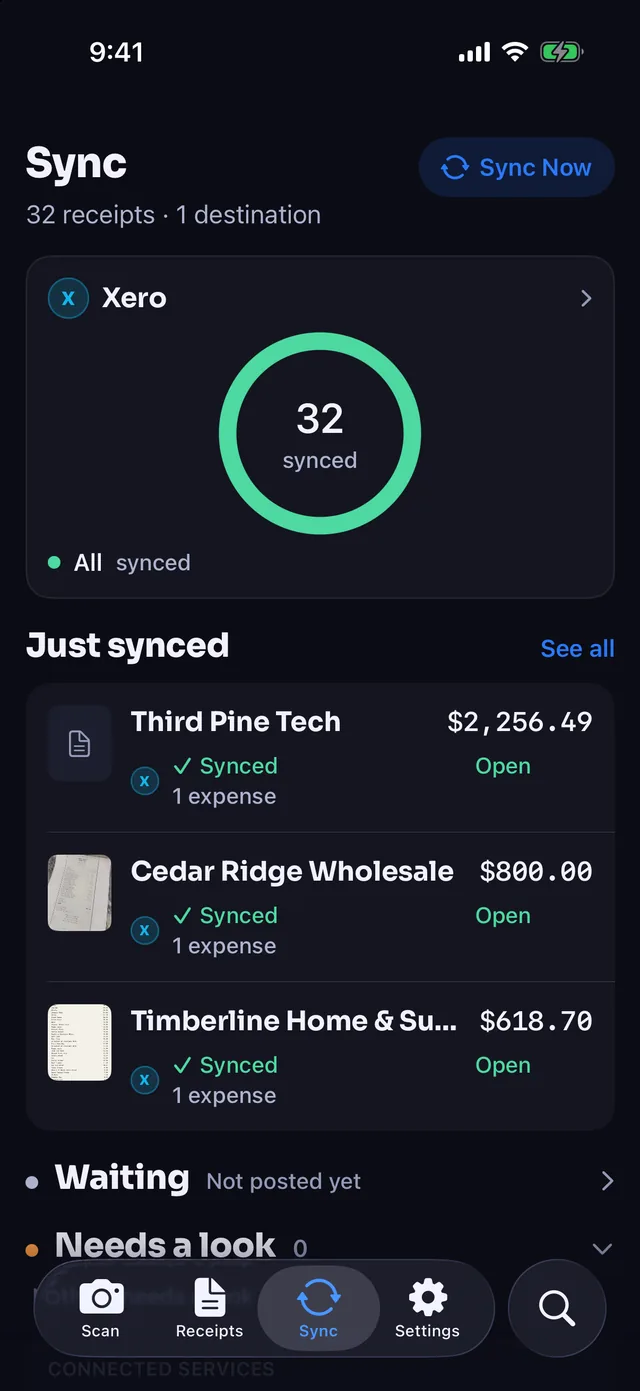
Sending after each scan starts off, so you can review your receipts and send each one when it is ready. Turn on sending after each scan to post receipts to Xero automatically. You can check connection status and recent sync activity anytime on the Sync tab.
What Goes Into Xero
Every synced receipt creates a clean record in Xero that is ready for reconciliation:
- One spend money transaction per receipt: Even if a receipt has ten line items across three categories, Xero receives one spend money transaction with split lines that add up to the exact receipt total.
- Mapped to your chart of accounts: Line items are grouped and coded to the exact Xero expense accounts you selected.
- Paid from the bank account you choose: The transaction records against your designated Xero bank or credit card account.
- Receipt image attached: The original receipt photo or PDF attaches directly to the spend money transaction in Xero for audit records.
- Bank-feed matching inside Xero: When the charge clears your bank feed, Xero matches the imported bank line to the spend money transaction Receipt Rabbit created, and you confirm the match.
Set Up Your Xero Rules Once
In Receipt Rabbit’s Xero settings, you configure how the app talks to your books one time:
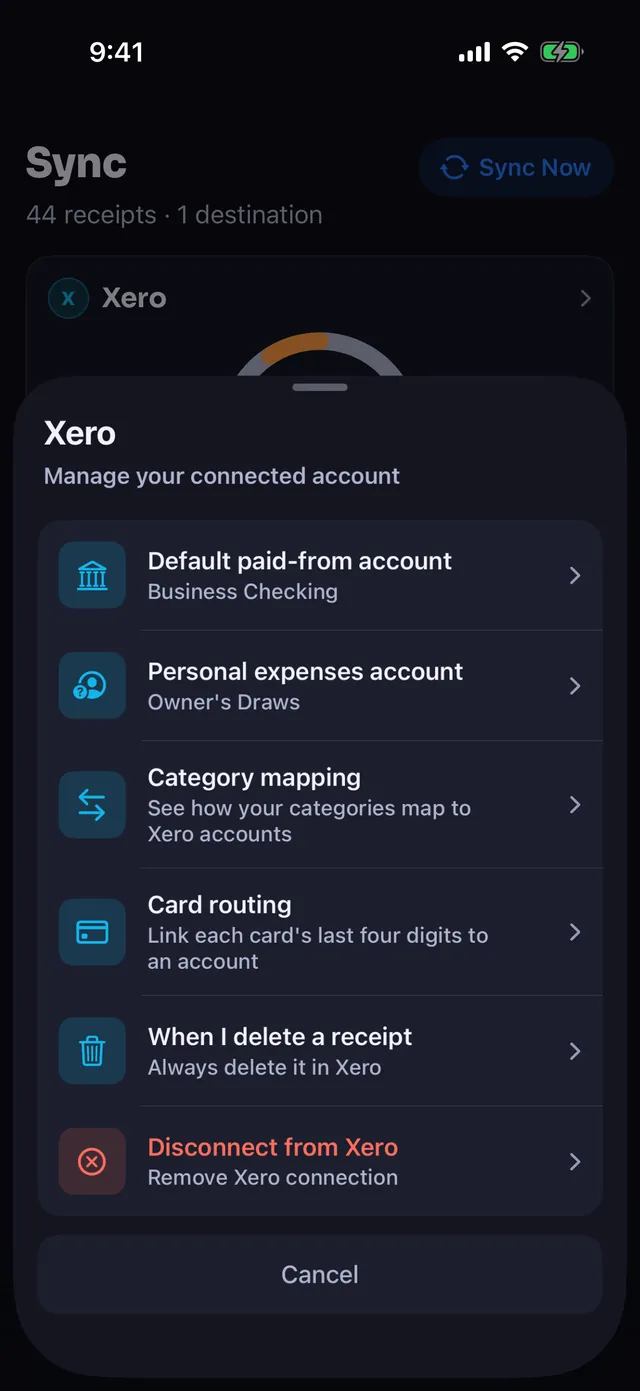
- Category mapping: Map Receipt Rabbit’s categories to your Xero chart of accounts.
- Paid-from and personal accounts: Choose your default paid-from bank account and the personal account that lines not marked business are booked to on split receipts.
- Card routing: Route specific payment cards (by the last four digits on the receipt) to the matching bank or credit card account in Xero.
- Sync and delete behavior: Choose whether receipts sync automatically after scanning or wait for manual review, and whether deleting a receipt in Receipt Rabbit also removes it from Xero, never does, or asks each time. A transaction already reconciled in Xero stays in Xero.
Bank Security and Boundaries
Receipt Rabbit connects only to the Xero endpoints it needs to read your chart of accounts and contacts, and to create spend money transactions with attachments.
Reads
- Your chart of accounts: expense accounts and the bank account receipts are paid from
- Your contacts, to avoid creating duplicates
Writes
- Spend money transactions: the itemized expenses created from your receipts
- Attachments: the receipt image on each transaction
- Contacts: only when a receipt’s store is not already a contact
Receipt Rabbit does not read your bank feed and never starts a payment or transfer. Your bank connection stays inside Xero, and all bank-feed reconciliation happens inside Xero.
Receipt Rabbit has no user accounts and no user database. Your receipts live on your iPhone and in your own iCloud, and your Xero connection is kept in your iPhone’s Keychain. Phone numbers and card numbers are stripped from receipt text on your device before anything is sent for categorization. Full detail is in the Privacy Policy and the End User License Agreement.
Receipt Rabbit is an iPhone app for iOS 18 and later, available on the App Store. Xero is included from version 1.1. Questions: [email protected].
Pricing
You can test line-item extraction on the free plan before connecting your books.
- Free ($0): 30 receipt scans per month, full line-item extraction and categorization, and plain CSV and receipt image exports.
- Pro ($7.99/month or $59.99/year): 300 receipt scans per month, Xero sync, QuickBooks Online sync, Lunch Money sync, expense report workbooks, and tax-year packages for your accountant.
Frequently Asked Questions
Does Receipt Rabbit work with Xero?
Yes. With Pro, each receipt goes to Xero as one spend money transaction split across your expense accounts, paid from the bank account you choose, with the receipt image attached. Receipt Rabbit does not read your bank feed and never starts a payment or transfer.
How does receipt reconciliation work with my Xero bank feed?
Receipt Rabbit pushes a spend money transaction to Xero using the date and total from the receipt. When your bank feed imports the cleared charge into Xero, Xero matches the bank statement line to the spend money transaction. You confirm the match inside Xero.
How does Receipt Rabbit handle a receipt with both business and personal items?
You mark which line items are business inside Receipt Rabbit. Business lines go to your mapped expense accounts, and everything not marked business goes on one line booked to a personal account you pick once in your Xero settings, so the transaction total matches the full card charge. Until you pick that account, receipts with personal lines wait instead of going to Xero.
What if I use multiple business cards or bank accounts?
You can set a default paid-from account in your Xero settings and add card routing rules. When Receipt Rabbit reads the last four digits of a card on a receipt, it assigns the spend money transaction to the corresponding bank or credit card account in Xero. You can also change the paid-from account on any single receipt.
Can I review receipts before they go to Xero?
Yes. Sending after each scan starts off, so receipts only post to Xero when you tap sync. Turn on sending after each scan if you want receipts to go to Xero as soon as scanning finishes.
Spot an error on this page? Email [email protected] and we will correct it.
Receipt Rabbit is on the App Store now, with Xero included.
Xero is a trademark of Xero Limited. Receipt Rabbit is not affiliated with, endorsed by, or sponsored by Xero Limited.
Platform: iPhone (iOS 18 and later)
Requirement: Receipt Rabbit Pro ($7.99/month or $59.99/year) and an active Xero account
By Pine River Labs · Updated