

iPhone expense reports and tax-year export for your accountant
On Pro, share an itemized report with photos and spreadsheets from any selected receipts, or hand your accountant one tax-year ZIP file.

iOS 18 and later. No login or account. Reports and tax ZIP on Pro, 7‑day free trial on annual.
Share a complete expense report from any selected receipts
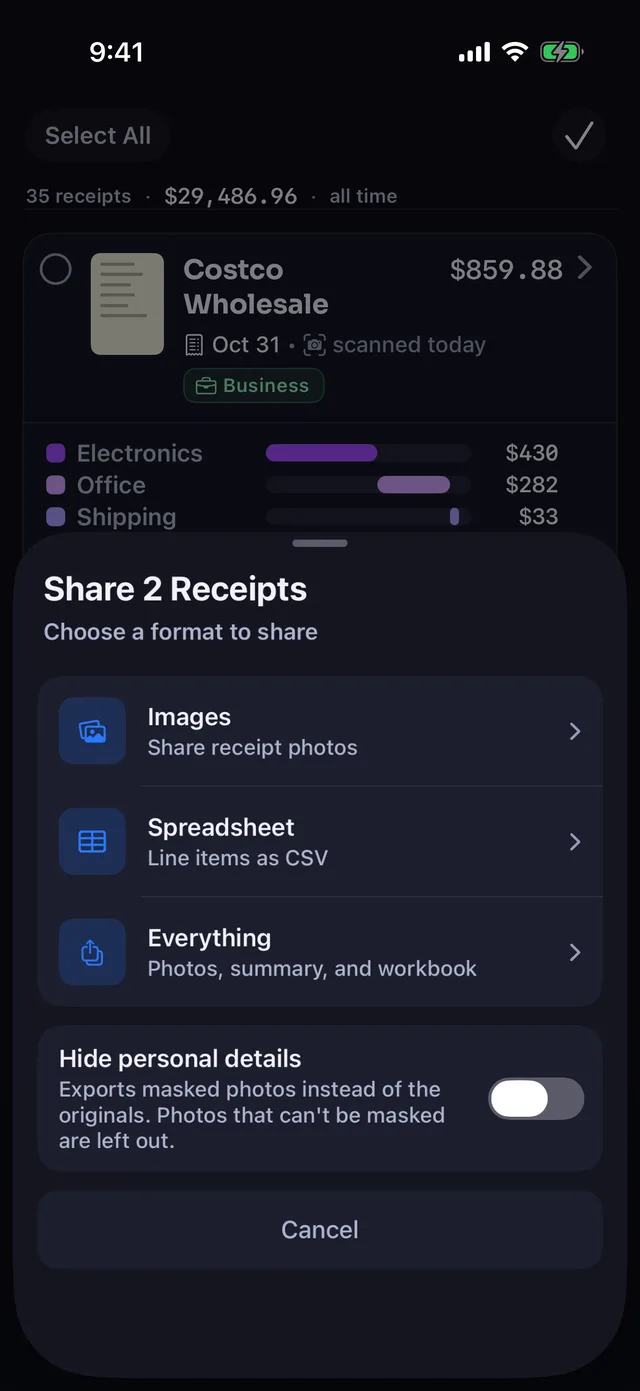
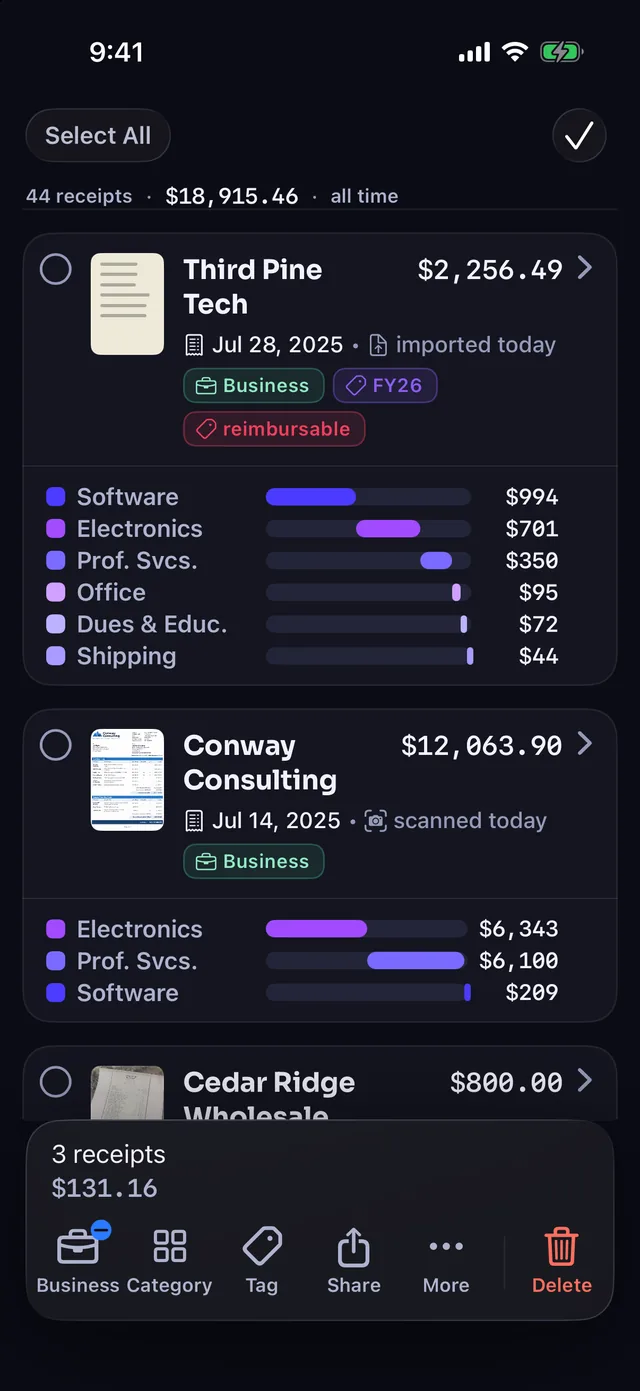
Select your receipts in the Receipts tab, tap Share, and choose "Everything" on the Pro plan. Receipt Rabbit bundles the files below so you can send them straight to a client.
| File | What is in it |
|---|---|
| Expense Report.md | Receipt table, totals, and items grouped by category |
| Selected Receipts.csv | 13-column line-item data in CSV format |
| Selected Receipts.xlsx | Two-tab workbook: Receipts and Line Items |
| Receipt images | Original or masked receipt photos |
- Any date range: Pick specific receipts from a single project or across several months before tapping Share.
- Free sharing options: "Images: Share receipt photos" and "Spreadsheet: Line items as CSV" work on every plan, including Free.
- Hide personal details: Exports masked photos instead of the originals. Photos that can't be masked are left out.
| Description | Category | Amount | Business |
|---|---|---|---|
| 27-inch USB-C Monitor | Electronics & Tech | 389.99 | yes |
| Multipurpose Printer Paper 5-ream Case | Office Supplies | 39.99 | yes |
| Shipping Mailers 100ct | Shipping & Postage | 29.99 | yes |
| Diapers Size 5 | Kids & Baby | 44.99 | no |
| First Aid Kit | Medical & Dental | 24.99 | no |
Sample rows from one Cedar Ridge Wholesale receipt on the Line Items tab of Selected Receipts.xlsx, showing 4 of 13 columns.
Hand your accountant one ZIP file for the whole tax year
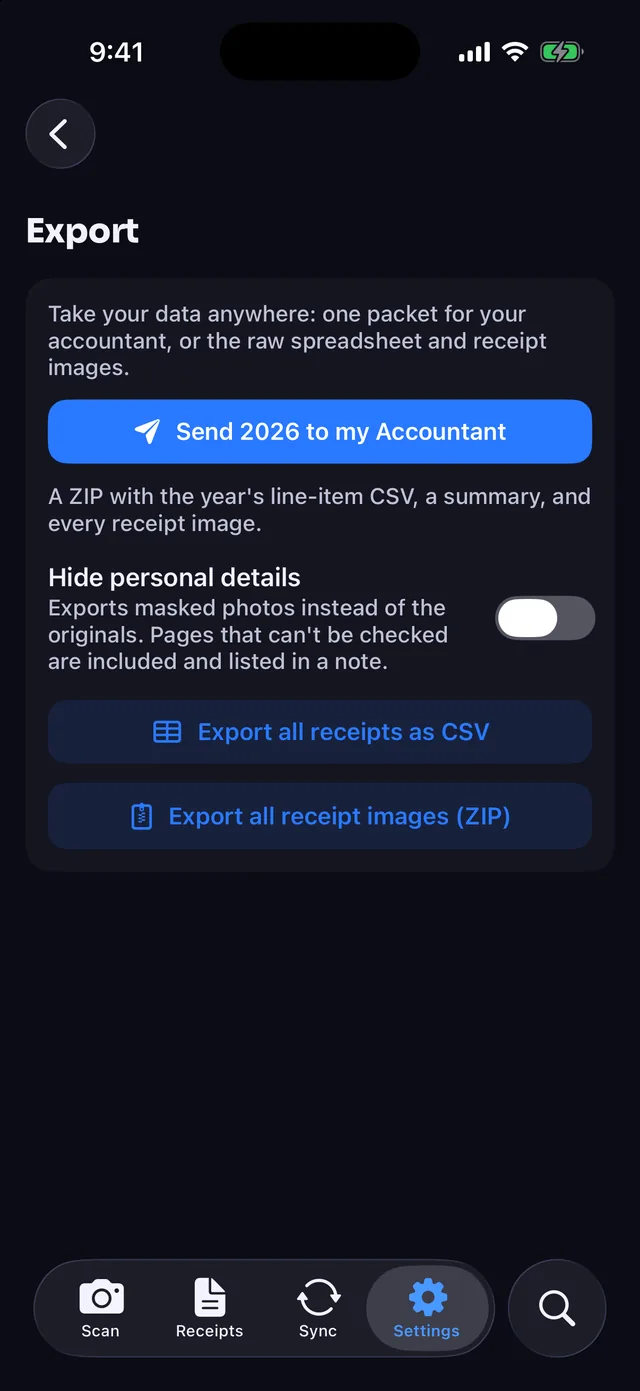
Open Settings on the Pro plan and tap "Send 2026 to my Accountant". Receipt Rabbit bundles your entire year of documentation and spreadsheets into "Receipt Rabbit 2026.zip".
| In the ZIP | Details |
|---|---|
| line-items-2026.csv | 13-column CSV with one row per line item |
| Receipt Rabbit 2026.xlsx | 3-tab workbook: Totals (summary), Receipts, and Line Items |
| receipts/ folder | Every receipt image and PDF from that tax year |
- Hide personal details switch: Exports masked photos instead of the originals. Pages that can't be checked are included and listed in a note.
- Full-archive backups: Export all receipts as CSV and Export all receipt images (ZIP) are free on every plan.
- Receipt Rabbit 2026/
- line-items-2026.csv
- Receipt Rabbit 2026.xlsx
- receipts/
| Row | What it shows |
|---|---|
| Receipts | Total receipt count for the tax year |
| Total spend | Combined dollar total across all receipts |
| Business | Total flagged as business expenses |
| HSA/FSA | Total flagged as HSA/FSA eligible |
| Business spend by Schedule C line | One row per Schedule C line |
| Spend by category | One row per spending category |
Unzipped Receipt Rabbit 2026/ folder and the 2026 workbook's Totals tab layout.
Filter by tag, date, or payment card before you export
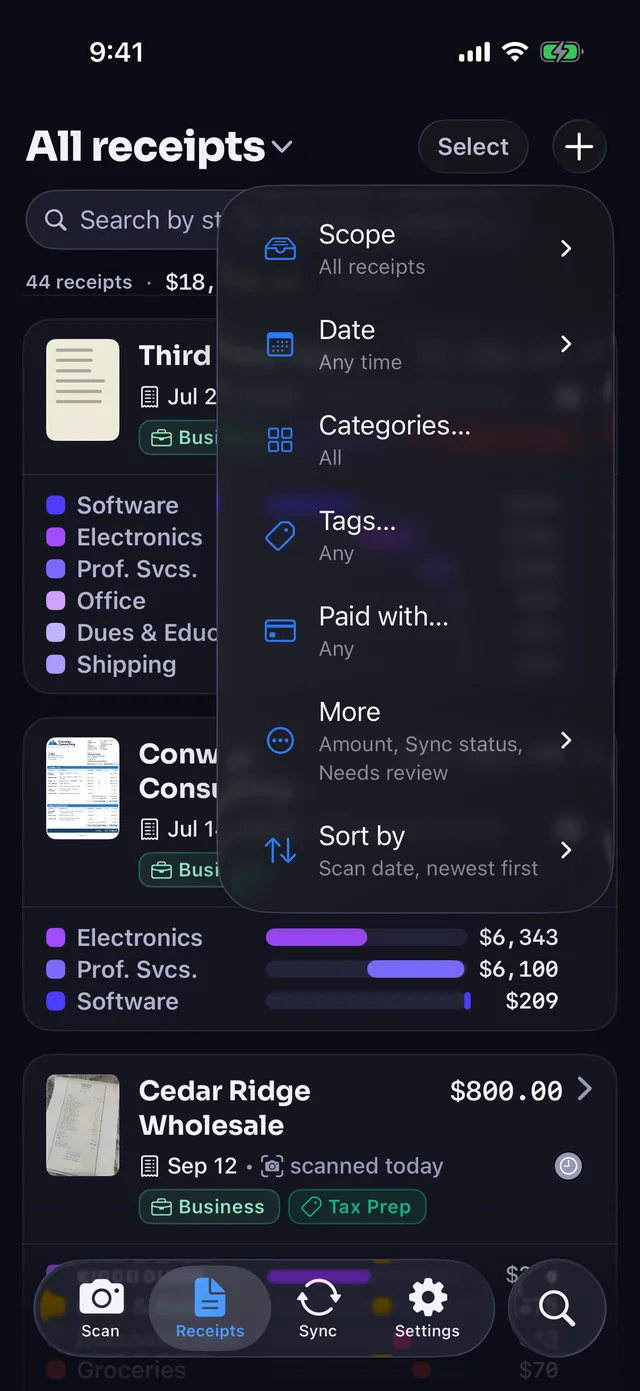
Use the Receipt list Filter menu to narrow by Scope, Date, Categories, Tags, Paid with, and more. Once your list matches what your client or accountant needs, select those receipts and tap Share.
- Custom tags: Apply tags like "reimbursable", "Tax Prep", or "FY26" to pull matching receipts before you export.
- Automatic Trips on every plan: Set a trip name, date range, and tags to apply them to every receipt in that window, past or future.
- Default trip exclusions: Trips skip utilities, rent, insurance, software subscriptions, and shipped orders by default.
- Payment cards on every plan: Receipt Rabbit records the last 4 digits printed on a receipt so you can filter by "Paid with".
Separate business lines from personal items on the same receipt
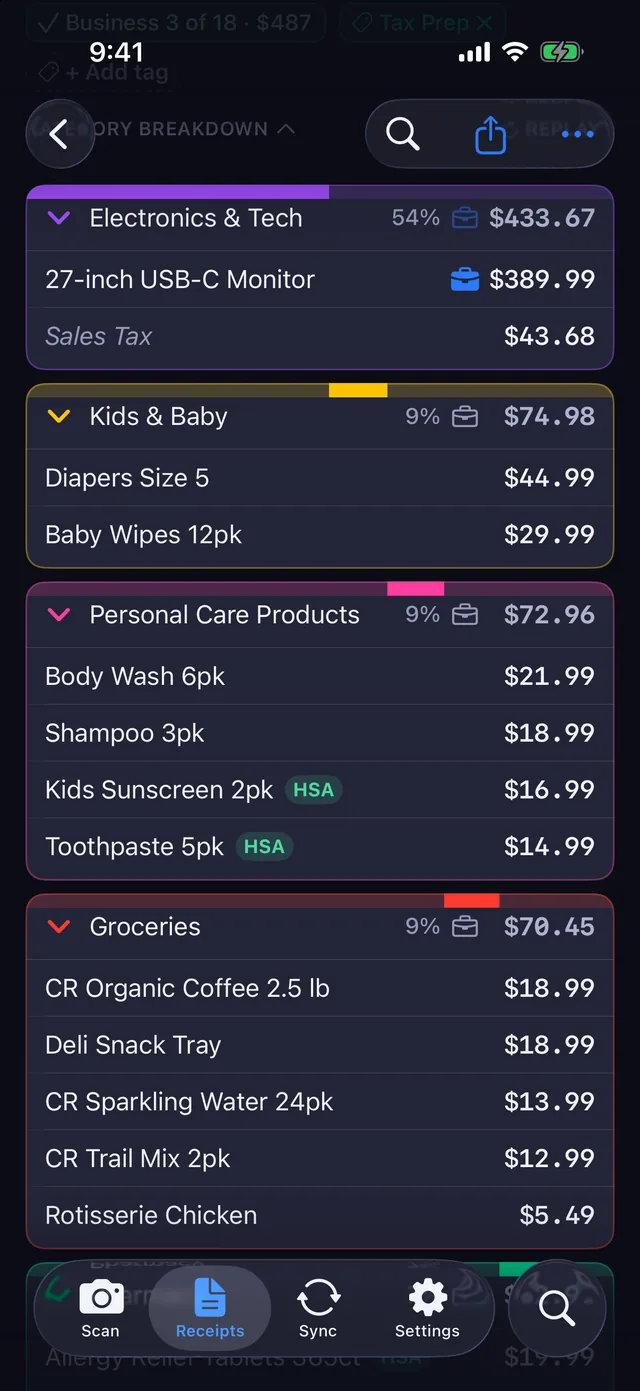
Receipt Rabbit categorizes every line item on a receipt across 42 categories in 11 groups. When a store run mixes work supplies with household items, you only count the business portion.
- Whole-receipt or line-level flags: Mark an entire receipt as Business, or flag only the individual lines that are business expenses.
- Category dollar breakdowns: Open any receipt to see each category's share and dollar total, with a briefcase on the business lines.
- iPhone and iCloud storage: Receipts are stored on your iPhone and mirrored to your private iCloud. No login.
Reports and the tax ZIP are on Pro. Exports and backups are free.
Free
- $0 for 30 receipts a month: Includes Trips, payment cards, and sharing selected receipts as Images or a line-item CSV.
- Full archive backups: Export all receipts as CSV and export all receipt images as a ZIP file at any time.
- Line-item categorization: Categorizes every line item with business flags and category dollar breakdowns.
Plus
- $4/month or $30/year: Scans up to 100 receipts a month (no trial).
- Everything in Free: All Free scanning, tagging, filtering, and export features.
- Lunch Money sync: Syncs receipts directly to Lunch Money.
Pro
- $8/month or $60/year: Scans up to 300 receipts a month, with a 7‑day free trial on the annual plan.
- Pro reports and tax packages: Unlocks the "Everything" expense report bundle and the single-ZIP tax-year accountant package.
- Accounting sync with images: Syncs to QuickBooks Online and Xero with the receipt image attached, plus Lunch Money.
Frequently asked questions
What files are inside a Pro expense report?
Choosing "Everything" on the share sheet exports "Expense Report.md", "Selected Receipts.csv", "Selected Receipts.xlsx" with 2 tabs (Receipts and Line Items), and the receipt images.
What does my accountant get in the tax-year ZIP package?
Tapping "Send 2026 to my Accountant" produces "Receipt Rabbit 2026.zip". Inside are "line-items-2026.csv", "Receipt Rabbit 2026.xlsx" with 3 tabs (Totals for the summary, Receipts, and Line Items), and a "receipts" folder of every image and PDF.
Which receipts are left out of the tax-year package?
Possible duplicates, failed scans, and receipts with no total are left out. Anything else that needs a look is flagged in a Needs review column.
Can I export my receipts on the Free plan?
Yes, the Free plan includes several export options. You can share selected receipts using "Images: Share receipt photos" or "Spreadsheet: Line items as CSV", and you can use Settings to export all receipts as CSV or export all receipt images (ZIP).
How do I pull all the receipts from a single client trip?
Create a Trip with a name, start date, optional end date, and tags, which applies those tags to every receipt dated in that range (skipping utilities, rent, insurance, software subscriptions, and shipped orders by default). Filter your receipt list by that tag, then share.
What does the "Hide personal details" option do?
Both switches export masked photos instead of the originals. On the share sheet, photos that can't be masked are left out. On the tax-year package, pages that can't be checked are included and listed in a note.
Which plan do I need for XLSX workbooks and the accountant package?
You need the Pro plan, which costs $8/month or $60/year for 300 receipts a month and includes a 7‑day free trial on the annual plan. Pro also adds QuickBooks Online and Xero sync with the receipt image attached.
Spot an error on this page? Email [email protected] and we will correct it.
Get your receipts ready for your client or accountant
Download Receipt Rabbit on the App Store for iOS 18 and later. Start with 30 receipts a month on Free, or try Pro annual free for 7 days.
Platform: iPhone (iOS 18 and later)
By Pine River Labs · Updated